> For the complete documentation index, see [llms.txt](https://developers.citrusad.com/llms.txt). Markdown versions of documentation pages are available by appending `.md` to page URLs; this page is available as [Markdown](https://developers.citrusad.com/integration/reference/integration-option-3-sync-audiences-only.md).
# Option 3: Sync Audiences only
{% hint style="info" %}
Epsilon Retail Media's documentation is now centralized with our knowledgebase!
For up to date guides, please view [this page](https://help.citrusad.com/retail-media-interface/integration/data-api/audience-targeting-new/integration-option-3-sync-audiences-only) in the new Integration APIs space of our documentation.
{% endhint %}
### Overview
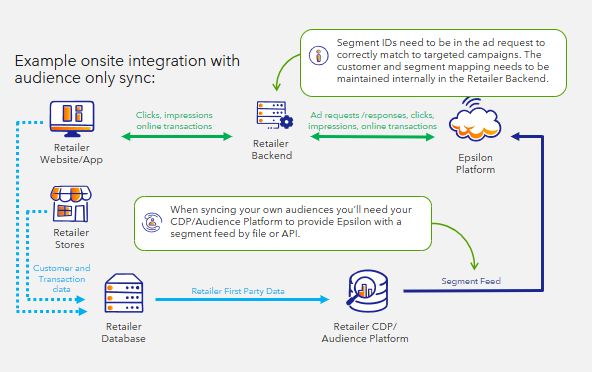
For organizations unable to share customer identifiers, audience activation can be achieved by syncing segment feeds and passing segment IDs in ad requests. This privacy-first approach enables both custom and general audience targeting without exposing customer-level data. Ad requests must include segment identifiers to support targeted activation.
### Integration Requirements
* Segment feed must specify which audience segments are available to designated advertiser teams.
* Ad requests must include relevant segment ID(s) for each customer.
### How It Works
The CDP or audience platform provides Epsilon with a segment feed through file upload or API. Segment IDs included in ad requests are used to match audiences to campaigns. Mapping between customers and segments is maintained internally within the retailer's backend systems.
### Integration Examples
**Ad Request Example**: Ad request containing segment IDs:
```http
POST $BASE_URL/v1/ads/generate HTTP/1.1
accept: application/json
content-type: application/json
Authorization: Basic
{
"audience": {
"segments": [
{
"segmentIds": [
"segment-1"
]
},
{
"sourceId": "RETAILER_SOURCE_2",
"segmentIds": [
"general-segment-4","general-segment-3"
]
}
]
},
"sessionId": "ec9-4e07-881d-3e9",
"dtmCookieId": "AAAF8xLBTA968AB6TOthAAAAAAE",
"placement": "search",
"catalogId": "628dbe95-2ec9-4e07-881d-3e9f92ab2e0b",
"searchTerm": "chocolate",
"options": {
"filterMode": "AndOr"
},
"maxNumberOfAds": 3
}
```
{% hint style="info" %}
Are you syncing segments from multiple sources?
If you are, you'll also need to provide the `sourceId` in the segment object. This value is agreed between yourself and Epsilon to reference the segment's source. An example might be `customer-cdp-1`.
If you are only syncing from one source/CDP, you only need to send the `segmentIds` in the `segment` array.
{% endhint %}
### Feed File Sync Integration (Recommended)
When syncing segments, we only require one file.
#### Segment File
A segment file is used to provide a segment ID which is shown in the UI, a name, and description. It can also be used to specify any specific team\_ids that can view a segment, allowing you to curate segments for specific advertisers.
| segment\_id | name | description | team\_ids |
| ----------------- | ------------------------------------- | -------------------------------------------------------------- | -------------------------------------------------------------------------------- |
| general-segment-1 | High Spending Shoppers | Shoppers with an average weekly shop in the top 15%. | |
| general-segment-2 | Value Shoppers | Shoppers that have a higher basket % of value driven products. | |
| general-segment-3 | Recurring Shoppers | Shoppers that shop every week on average. | |
| custom-segment-1 | Custom: High Purchase Recency BrandCo | Customers purchasing BrandCo in the last 30 days. | \["a5166fc4-f874-4741-a721-c05ffd9941a5","92f4b91f-0089-4102-b13b-6015da8e0174"] |
View the Segment Reference Guide here
### API Sync Integration
When syncing customers and segments by API, there are one or two operations that need to be completed.
1. Create segments
2. Optional: manager segment access
#### Creating Segments via API
As you are managing the customer-segment relationship prior to the ad request, you only need to send segments.
You need to provide a segment ID which is shown in the UI, a name, description, as well as your retailer team.
{% hint style="info" %}
The segments API uses bearer authorisation used by the Partner API. You will need to generate a bearer token and use it. Learn more: [Authentication requests](/partner/reference/authenticating-requests.md).
{% endhint %}
```http
POST $BASE_URL/v1/segments HTTP/1.1
accept: application/json
content-type: application/json
Authorization: Bearer
{
"segment":{
"segmentId": "general-segment-4",
"sourceId": "DEFAULT_SOURCE_ID",
"name": "Value Shoppers",
"description": "Shoppers that have a higher basket % of value driven products.",
"retailerTeamId": "13c84def-41cb-4f99-a3fc-6788264f79fe"
}
}
```
View the reference for the Create a segment endpoint [here](/partner/reference/createsegment.md).
If syncing segments via API. This `sourceId` aligns to the ad request.
{% hint style="info" %}
Maximum of 100 segments per ad request.
If you are syncing more than 100 segments, please contact Epsilon. If you exceed 100 segments per customers, ad requests may have reduced segment pooling and truncate segments in the request.
In the event of truncations, you will see the `metadata.warnings`field in the ad response appear and populate, like below:
```
"metadata": {
"warnings": [
"Audience Segment IDs exceeded the limit of 100 and were truncated"
]
}
```
{% endhint %}
#### Optional: manage segment access
You can use the manage-access function to provide access to selected advertisers to see the segment, allowing you to curate segments for specific advertisers.
```http
POST $BASE_URL/v1/segments/{id}:manage-access HTTP/1.1
accept: application/json
content-type: application/json
Authorization: Bearer
{
"accessTeamIds":[
"90d5f138-2090-412b-a397-1f59ea6a31b3","1439f6f2-8c43-4ec5-b511-fc153f7d8119"
]
}
```
View the reference for the Manage access to a specific segment endpoint [here](/partner/reference/manageaccess.md).