> For the complete documentation index, see [llms.txt](https://developers.citrusad.com/llms.txt). Markdown versions of documentation pages are available by appending `.md` to page URLs; this page is available as [Markdown](https://developers.citrusad.com/integration/reference/integration-option-2-sync-customers-audience.md).
# Option 2: Sync Customers & Audience
{% hint style="info" %}
Epsilon Retail Media's documentation is now centralized with our knowledgebase!
For up to date guides, please view [this page](https://help.citrusad.com/retail-media-interface/integration/data-api/audience-targeting-new/integration-option-2-sync-customers-audience) in the new Integration APIs space of our documentation.
{% endhint %}
### Overview
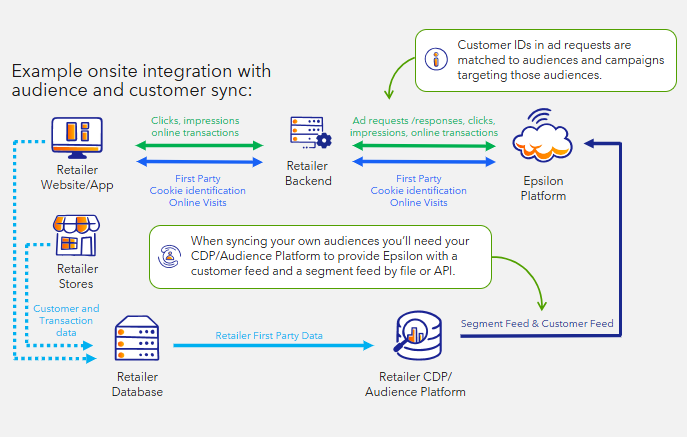
Retailers with clean rooms or self-managed audience segments can synchronize customer and segment data to enable custom audience delivery for top advertisers and general audiences. This integration involves using your CDP to supply customer/segment information to Epsilon. Either by API or file.
### Integration Requirements
* Standard onsite integration must include customer ID across all relevant touchpoints (where available).
* Customer ID feed of customers, by API or file feed.
* Segment feed by API or file feed.
### How It Works
The CDP or audience platform provides customer and segment data to Epsilon using file upload or API. Customer IDs included in ad requests are matched to audience segments and associated campaigns. This enables precise targeting based on custom or general audience definitions.
### Integration Examples
**Ad Request Example**: Ad request containing customer ID:
```http
POST $BASE_URL/v1/ads/generate HTTP/1.1
accept: application/json
content-type: application/json
Authorization: Basic
{
"customerId": "wertg5432a",
"sessionId": "ec9-4e07-881d-3e9",
"dtmCookieId": "AAAF8xLBTA968AB6TOthAAAAAAE",
"placement": "search",
"catalogId": "628dbe95-2ec9-4e07-881d-3e9f92ab2e0b",
"searchTerm": "chocolate",
"options": {
"filterMode": "AndOr"
},
"maxNumberOfAds": 3
}
```
{% hint style="info" %}
Your ad request must contain `customerId`, regardless of if you are integrating via file or API.
{% endhint %}
### Feed File Sync Integration (Recommended)
When syncing customers and segments by file, we require two files:
* Segment file
* Customer file
#### Segment File
A segment file is used to provide a segment ID which is shown in the UI, a name, and description. It can also be used to specify any specific team\_ids that can view a segment, allowing you to curate segments for specific advertisers.
| segment\_id | name | description | team\_ids |
| ----------------- | ------------------------------------- | -------------------------------------------------------------- | -------------------------------------------------------------------------------- |
| general-segment-1 | High Spending Shoppers | Shoppers with an average weekly shop in the top 15%. | |
| general-segment-2 | Value Shoppers | Shoppers that have a higher basket % of value driven products. | |
| general-segment-3 | Recurring Shoppers | Shoppers that shop every week on average. | |
| custom-segment-1 | Custom: High Purchase Recency BrandCo | Customers purchasing BrandCo in the last 30 days. | \["a5166fc4-f874-4741-a721-c05ffd9941a5","92f4b91f-0089-4102-b13b-6015da8e0174"] |
View the Segment Reference Guide [here](/integration/reference/audience-targeting-reference.md#segment-feed-required-when-syncing-your-own-segments).
#### Customer File
Your customer file is used to create a single customer and link them to segments, you only need to provide `customer_id` and `segment_ids`
| customer\_id | segments |
| ------------ | ------------------------------------------- |
| cust\_12345 | \["general-segment-3", "general-segment-4"] |
| cust\_67890 | \["general-segment-3"] |
View the Customer Reference Guide [here](/integration/reference/audience-targeting-reference.md#customer-feed-required-when-syncing-your-own-segments-and-customers).
{% hint style="info" %}
Maximum of 100 segments per customer.
If you are syncing more than 100 segments for a customer, please contact Epsilon. If you exceed 100 segments per customers, ad requests may have reduced segment pooling and truncate segments in the request.
{% endhint %}
### API Sync Integration
When syncing customers and segments by API, there are three operations that need to be completed.
1. Create segments
2. Optional: manager segment access
3. Create customers
4. Manage customer-segment linking
#### Creating Segments via API
The first thing you want to do is create your segments to link customers to.
You need to provide a segment ID which is shown in the UI, a name, description, as well as your retailer team.
{% hint style="info" %}
Important: The segments API uses bearer authorisation used by the Partner API. You will need to generate a bearer token and use it. Learn more: [Authentication requests](/partner/reference/authenticating-requests.md).
{% endhint %}
```http
POST $BASE_URL/v1/segments HTTP/1.1
accept: application/json
content-type: application/json
Authorization: Bearer
{
"segment":{
"segmentId": "general-segment-4",
"sourceId": "DEFAULT_SOURCE_ID",
"name": "Value Shoppers",
"description": "Shoppers that have a higher basket % of value driven products.",
"retailerTeamId": "13c84def-41cb-4f99-a3fc-6788264f79fe"
}
}
```
View the reference for the Create a segment endpoint [here](/partner/reference/createsegment.md).
#### Optional: manage segment access
You can use the manage-access function to provide access to selected advertisers to see the segment, allowing you to curate segments for specific advertisers.
```http
POST $BASE_URL/v1/segments/{id}:manage-access HTTP/1.1
accept: application/json
content-type: application/json
Authorization: Bearer
{
"accessTeamIds":[
"90d5f138-2090-412b-a397-1f59ea6a31b3","1439f6f2-8c43-4ec5-b511-fc153f7d8119"
]
}
```
View the reference for the Manage access to a specific segment endpoint [here](/partner/reference/manageaccess.md).
#### Creating Customers via API
{% hint style="info" %}
The customers API uses basic authorisation used by the Integration API.
{% endhint %}
```http
POST $BASE_URL/v1/customers HTTP/1.1
accept: application/json
content-type: application/json
Authorization: Basic
{
"customers": [
{
"id": "cust_12345"
},
{
"id": "cust_67890"
}
}
]
}
```
Once complete, you also need to create segments to link customers to. You can create up to 100 customers per request.
View the specification for the API to Create or update a customer [here](/integration/reference/create-or-update-a-customer.md).
#### Link Customers to Segments via API
After creating the segments, use the /customers/manage-segments API to link customers to segments
```http
POST $BASE_URL/v1/customers/manage-segments HTTP/1.1
accept: application/json
content-type: application/json
Authorization: Basic
{
"customerId": "cust_12345",
"teamId":"13c84def-41cb-4f99-a3fc-6788264f79fe",
"segments": {
"segmentIds":[
"general-segment-4","general-segment-3"
]
}
}
```
{% hint style="info" %}
teamId in this request is your retailer team ID.
{% endhint %}
View the specification for the API to manage segments and customers here.