> For the complete documentation index, see [llms.txt](https://developers.citrusad.com/llms.txt). Markdown versions of documentation pages are available by appending `.md` to page URLs; this page is available as [Markdown](https://developers.citrusad.com/integration/reference/integrating-your-banner-x-previewer.md).
# Banner X previewer
{% hint style="info" %}
Epsilon Retail Media's documentation is now centralized with our knowledgebase!
For up to date guides, please view [this page](https://help.citrusad.com/retail-media-interface/integration/generating-ads/banner-x-responsive/integrating-your-banner-x-previewer) in the new Integration APIs space of our documentation.
{% endhint %}
This document outlines the process for retailers to integrate a banner X previewer into their workflow. This allows for complete control over the preview rendering, ensuring it matches the live website experience.
{% hint style="info" %}
This is an integration requirement
This previewer integration ensures your Banner X creative is rendered correctly when creating and reviewing campaigns, it creates confidence both by advertisers as well as retailers when managing campaigns.
{% endhint %}
## Benefits of a previewer
A previewer offers several advantages:
* Advertisers can preview their banner’s appearance before launching and managing their campaign to ensure it meets expectations and standards..
* Retailers can review and approve banners before they appear live on their website, ensuring consistency and quality control.
* Any changes to your live site (that do not impact creative dimensions) can be made with no dependency on Epsilon Retail Media.
## How it works
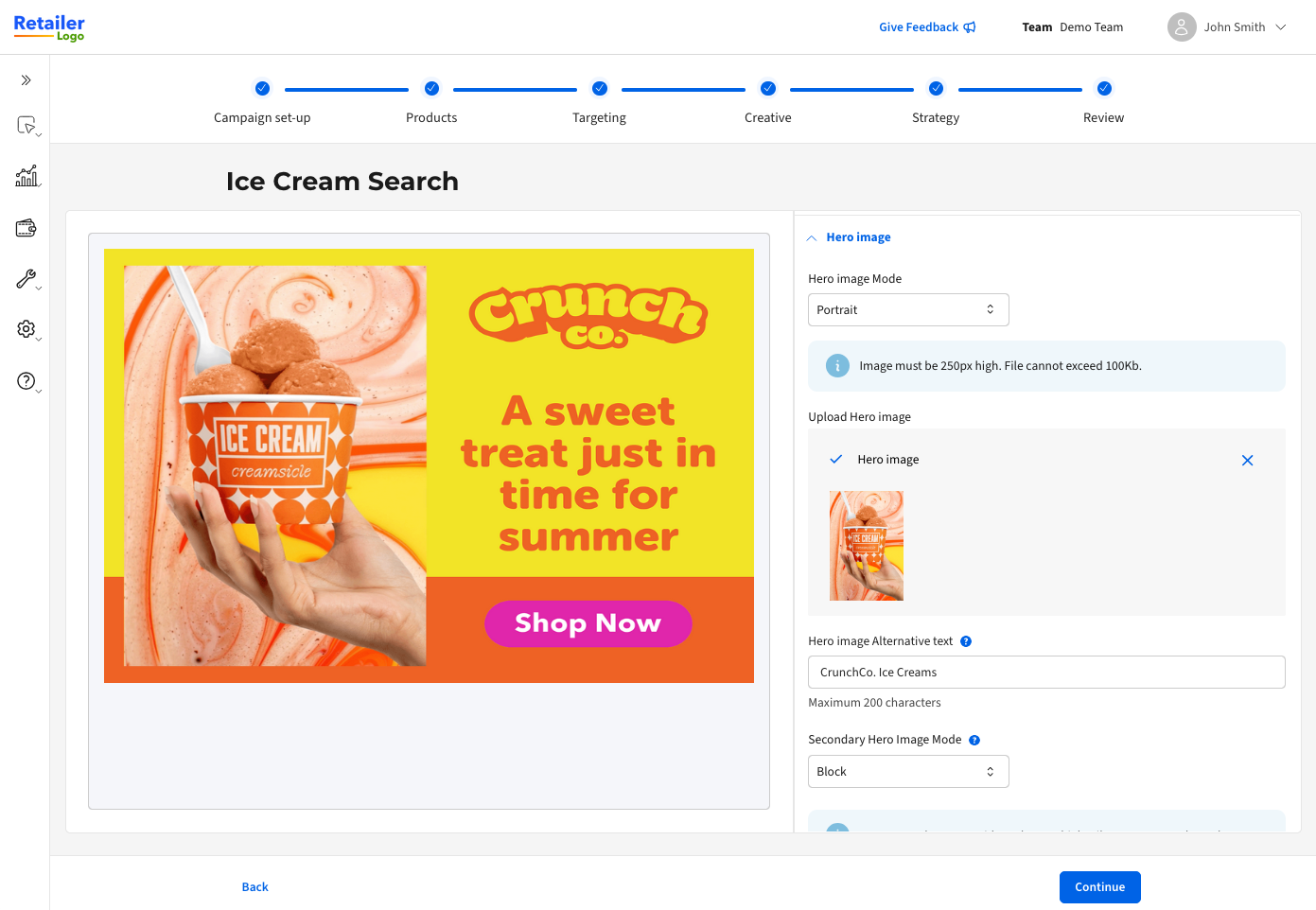
To give advertisers a real-time preview of how banners will appear on your site, we connect directly to your hosted previewer. This ensures banners render exactly as they would on your site. As you update your site, the previewer updates automatically, eliminating reliance on Epsilon and keeping banner rendering fully aligned with your latest changes.
## Retailer-hosted integration
You can integrate your banner previewer into our platform by hosting it on your site. This ensures that the previewer is embedded in the platform window using an iframe.
* **Host requirements**: You must host the previewer on a URL or link that you own and manage. This approach provides full flexibility to update and manage it as your site and design evolve, eliminating any dependency on our platform for changes.
* **Hosting recommendation**: We recommend hosting the previewer at a hidden URL, such as retailer.com/banner-previewer. However, you have the discretion to choose an appropriate location.
* This location may be an externalised hosted location that is not under your main domain if necessary, such as an externally accessible storage bucket or hosted solution (that is still under your maintenance).
* **Live site updates**: You can update how images and text are rendered on your live site. Any changes you make to banners on the live site should automatically reflect in the platform via your external previewer.
External previewer image
## How to integrate the preview specification
To display content from our platform on your external previewer, host an isolated banner previewer on a separate page you own and manage. We suggest using a URL like `https://www./banner-preview/bannerx`.
### OpenAPI specification
Below is the OpenAPI 3.0.3 specification for implementing the BannerX preview:
```
openapi: "3.0.3"
info:
version: 0.0.2
title: BannerX Preview
description: |
Specification for BannerX preview to be implemented by retailer.
paths:
"/banner-preview/bannerx":
get:
summary: Render a preview of BannerX content
operationId: getBannerXPreview
tags:
- retailer
parameters:
- name: "contentStandardId"
in: query
description: Content Standard ID to use for rendering. Can be ignored for external previewers if only 1 content standard is available.
examples:
content-standard-id:
value: "bd59be89-b13f-440f-a57e-0e5a481bec8b"
summary: "example content standard ID"
required: true
schema:
type: string
- name: "slotId"
in: query
description: Slot ID defined within the content standard to use for rendering. Can be ignored for external previewers if only 1 slot is available.
examples:
slot-id:
value: "left_ribbon"
summary: "slot ID"
required: true
schema:
type: string
- name: "slotType"
in: query
description: Banner slot type to use for rendering. Can be ignored for external previewers if only 1 slot type is available.
examples:
double-tile-slot-type:
value: "DOUBLE_TILE"
summary: "banner slot type"
required: true
schema:
type: string
enum:
- UNDEFINED
- BANNER
- SINGLE_TILE
- DOUBLE_TILE
- name: "headingText"
in: query
description: Heading text to insert into the banner rendering.
examples:
banner-heading-text:
value: "Juicy apples!"
summary: "banner heading text"
required: true
schema:
type: string
maxLength: 254
- name: "bannerText"
in: query
description: |
Banner text to insert into the banner rendering. ``, `` and `` tags are supported.
required: true
examples:
banner-text:
value: "Citrus banner text"
summary: "banner text"
schema:
type: string
maxLength: 110
- name: "bannerTextColour"
in: query
description: Banner text colour in RGB HEX format.
examples:
banner-text-color:
value: "#000000"
summary: "banner text colour"
required: false
schema:
type: string
- name: "ctaEnabled"
in: query
description: Flag to designate that CTA button should be rendered.
examples:
cta-enabled:
value: true
summary: "banner CTA enabled flag"
required: false
schema:
type: boolean
- name: "ctaLink"
in: query
description: |
Link for Call-To-Action element. Note: this may be a relative or absolute URL
depending on the configuration.
examples:
cta-link:
value: "https://www.retailer.com/promo/6ru0GM5"
summary: "banner CTA link"
required: false
schema:
type: string
maxLength: 100
- name: "backgroundColour"
in: query
description: Background colour of the rendered banner in RGB HEX format.
examples:
banner-background-color:
value: "#000000"
summary: "banner background colour"
required: false
schema:
type: string
- name: "backgroundImage"
in: query
description: Background image URL to render in the banner.
examples:
background-image-url:
value: "https://cdn.flavedo.io/s/7b965e85-64ae-4574-9d6d-4c45c448668e"
summary: "background image URL"
required: false
schema:
type: string
- name: "backgroundImagePosition"
in: query
description: Background image position.
examples:
background-image-position:
value: "TOP_ALIGNED"
summary: "background image position"
required: false
schema:
type: string
enum:
- UNDEFINED
- FILL
- REPEATING
- LEFT_ALIGNED
- RIGHT_ALIGNED
- TOP_ALIGNED
- BOTTOM_ALIGNED
- name: "secondaryBackgroundImage"
in: query
description: Secondary background image URL to render in the banner.
examples:
uat:
value: "https://cdn.flavedo.io/s/7b965e85-64ae-4574-9d6d-4c45c448668e"
summary: "secondary background image URL"
required: false
schema:
type: string
- name: "secondaryBackgroundImagePosition"
in: query
description: Secondary background image position.
examples:
uat:
value: "TOP_ALIGNED"
summary: "secondary background image position"
required: false
schema:
type: string
enum:
- UNDEFINED
- FILL
- REPEATING
- LEFT_ALIGNED
- RIGHT_ALIGNED
- TOP_ALIGNED
- BOTTOM_ALIGNED
- name: "heroImage"
in: query
description: Primary hero image URL.
examples:
primary-hero-image-url:
value: "https://cdn.flavedo.io/s/7b965e85-64ae-4574-9d6d-4c45c448668e"
summary: "primary hero image URL"
required: false
schema:
type: string
- name: "heroImageAltText"
in: query
description: Primary hero image alt text.
examples:
hero-image-alt-text:
value: "New flavour chips"
summary: "hero image alt text"
required: false
schema:
type: string
- name: "secondaryHeroImage"
in: query
description: Secondary hero image URL.
examples:
secondary-hero-image-url:
value: "https://cdn.flavedo.io/s/02c1440c-bad4-4cf8-a208-be910827e30a"
summary: "secondary hero image URL"
required: false
schema:
type: string
- name: "secondaryHeroImageAltText"
in: query
description: Secondary hero image alt text.
examples:
secondary-hero-image-alt-text:
value: "New flavour sauce"
summary: "secondary hero image alt text"
required: false
schema:
type: string
- name: "secondaryHeroMode"
in: query
description: Secondary hero image display mode.
examples:
secondary-hero-image-mode-block:
value: "BLOCK"
summary: "secondary hero image mode"
required: false
schema:
type: string
enum:
- UNDEFINED
- BLOCK
- LANDSCAPE
- name: "additionalFields"
in: query
description: |
Encoded list of key value pairs for additional data. Supported field types are:
- label: string value
- color: A hex color value (e.g. `#0a0a0a`)
- select: an enumerate list of strings
The fields are encoded using the following format:
`~_~`
Where:
- `~`: key and value separator
- `_`: key/value pair separator
The following characters are treated as reserved, and if they appear within either
the key or value they will be encoded using the value: `!`
Character
Encoded Value
-
!2D
.
!2E
_
!5F
~
!7E
The remainder special characters will be URL encoded.
For example. If we have the following field structure:
Key
Value
field-one
Has special chars: ".~_-"
field_two
#ffffff
This would be encoded in the `additionalFields` query parameter as:
`field!2Done~Has%20special%20chars%20%3A%20%22!2E!7E!5F!2D%22_field!5Ftwo~%23ffffff`
schema:
type: string
examples:
simple:
value: key1~value1_key2~value2
summary: Simple key value pairs with no encoding
complex:
value: "field!2Done~Has%20special%20chars%20%3A%20%22!2E!7E!5F!2D%22_field!5Ftwo~%23ffffff"
summary: Complex key value pairs with URL encoding and embedded reserved character escapes
- name: "gtins"
in: query
description: |
List of a subset of GTINs attached to the campaign.
Please note that this parameter is marked VOLATILE and may change or be deprecated in the future.
While we will inform prior to any changes to the API surface,
anyone relying on this parameter should be aware of it's volatility.
examples:
gtin-list:
value: ["7913494", "6815686"]
summary: "gtin list"
required: false
schema:
type: array
items:
type: string
style: form
explode: false
responses:
"200":
description: OK response
"400":
description: Bad request error response
content:
application/json:
schema:
properties:
error:
type: string
description: Error message.
"404":
description: Not found error response
content:
application/json:
schema:
properties:
error:
type: string
description: Error message.
"500":
description: Internal server error response
content:
application/json:
schema:
properties:
error:
type: string
description: Error message.
```
{% hint style="warning" %}
Banners must remain within the capabilities of the Banner X API response.
{% endhint %}
When a user loads the previewer in the platform, a GET request is made with a set of defined parameters that are rendered on your previewer. This is then iframed within the platform.
The request will look similar to the example below:
```
https://www.[YOUR_RETAILER_SITE]/bannerx?contentStandardId=bd59be89-b13f-440f-a57e-0e5a481bec8b&slotId=Search_in_grid_1&slotType=DoubleTile&headingText=Milk&bannerText=Milk&bannerTextColour=ecdfdf&backgroundColour=d55525&backgroundImagePosition=topaligned&secondaryBackgroundImagePosition=topaligned&heroImage=https%3A%2F%2Fstorage.googleapis.com%2Fcitrus-banner-images-pending-australia-southeast1%2Fstaging%2F74fc5966-8d8d-487e-b2a9-45f994957815&heroImageAltText=test&secondaryHeroImage=https%3A%2F%2Fstorage.googleapis.com%2Fcitrus-banner-images-pending-australia-southeast1%2Fstaging%2F2bfd0dcb-27d5-4469-a53d-c1681f675c6e&secondaryHeroImageAltText=test&secondaryHeroMode=landscape>ins=7459770>ins=59398>ins=7895365
```
### Additional fields
The content standard supports `additionalFields` as a set of key value pairs. This is encoded in a custom way in the query string for the previewer. Supported field types are:
* **label**: string value
* **color**: A hex color value (e.g. #0a0a0a)
* **select**: an enumerate list of strings
The fields are encoded using the following format: `~_~` Where:
* `~`: key and value separator
* `_`: key/value pair separator
### Reserved characters
The following characters are treated as reserved, and if they appear within either the key or value they will be encoded using the value: `!`
| Character | Encoded Value |
| --------- | ------------- |
| - | !2D |
| . | !2E |
| \_ | !5F |
| \~ | !7E |
The remainder special characters will be URL encoded. For example, if we have the following field structure:
| Key | Value |
| ---------- | --------------------------- |
| field-one | Has special chars: ".\~\_-" |
| field\_two | # ffffff |
This would be encoded in the `additionalFields` query parameter as: `additionalFields=field!2Done~Has%20special%20chars%20%3A%20%22!2E!7E!5F!2D%22_field!5Ftwo~%23ffffff`