> For the complete documentation index, see [llms.txt](https://developers.citrusad.com/llms.txt). Markdown versions of documentation pages are available by appending `.md` to page URLs; this page is available as [Markdown](https://developers.citrusad.com/partner/reference/user-1.md).
# User
{% hint style="info" %}
Epsilon Retail Media's documentation is now centralized with our knowledgebase!
For up to date guides, please view [this page](https://help.citrusad.com/retail-media-interface/partner/team-user-api/user-1) in the new Partner APIs space of our documentation.
{% endhint %}
## Overview
Users are individuals who belong to teams and can perform various actions within the Epsilon Retail Media system based on their permissions and roles.
### What is a User ID?
A User ID is a unique identifier for each user in the Epsilon Retail Media system. It is required in API requests to identify and manage specific users, such as updating user details, modifying permissions, or retrieving user information.
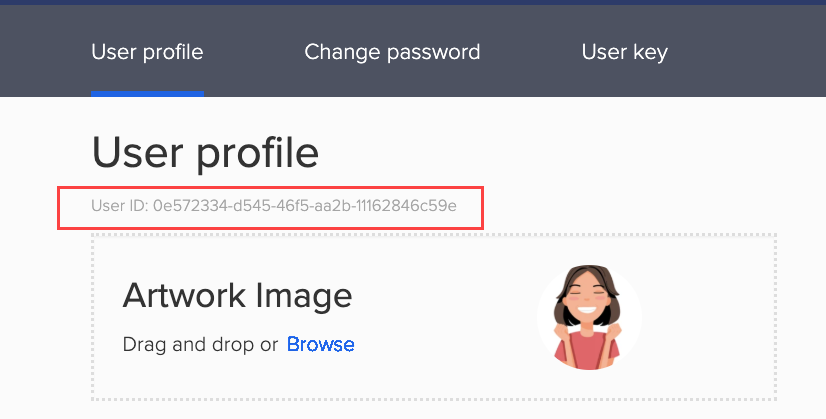
### Finding your User ID
To use the User API, you'll need your User ID. This identifies the specific user in API requests. You can find it by:
1. Log in to your Citrus Client.
2. Click the profile dropdown and select **User Profile**.
3. The User ID is displayed in the user profile section.
### User elements
Each user includes the following key elements:
| Element | Description |
| ----------------- | ----------------------------------------------------- |
| User ID | A unique identifier for the user. |
| Email | The user's email address for login and notifications. |
| First name | The user's first name. |
| Last name | The user's last name. |
| Logo ID | Unique identifier of the user's profile image. |
| Team memberships | List of teams the user belongs to. |
| Permissions | User's access level and permissions within teams. |
| Invitation status | Status of pending team invitations. |
### User API Field Definitions
The following are key user fields commonly used in API requests and responses:
| Field Name | Description |
| ------------------ | -------------------------------------------------------------------------------------------------------------------------------- |
| id | Unique identifier of the user. |
| email | Email ID of the user. |
| namespace | Namespace the user belongs to. |
| firstName | First name of the user. |
| lastName | Last name of the user. |
| logoUrl | URL to user's profile picture or logo. You can retrieve the logoUrl using [Retrieve file URL](/partner/reference/getfileurl.md). |
| teamIds | List of the user's team IDs. |
| receivedInvitation | Details of pending invitations. |
| inviteTeam | Root object for the invitation payload. |
| managerTeamId | Unique ID of the retailer team managing access and sending invites. Example: manager-team-123. |
| roleIds | Array of the user's permission strings. |
| teamId | ID of the team for user invitation. |
| retailerTeamId | Unique ID of the retailer-managed group. |
| offset | Number of records to skip before fetching results. |
### Available endpoints
| Endpoint | Description |
| --------------------------------- | --------------------------------------------------------------------------------------------------------------------------------------------------------------------------------------------------------------------------------------------------------------- |
| [Invite a user to the team](#) | Sends email invitation to join a specified team. Requires team ID and user email address. |
| [Retrieve current user detail](#) |
Retrieves the profile information of the signed-in user, including: -User ID, email, first name, last name, and -Pending team invitations with sender details. Use this endpoint to view details of the currently signed-in user.
|
| [Retrieve user details](#) |
Retrieves information about other users in the team or a specific user by user ID. Requires appropriate access (retailer or admin) within the namespace, and the user must be part of the team. This endpoint is used for team-level user management.
|
| [Update current user detail](#) | Modifies the signed-in user's first name, last name, and logo file ID. This endpoint does not support updating details of other users. |
| [Remove a user](#) | Removes a user from a team (requires appropriate permissions). |
| [Modify user permission](#) |
Updates user permissions by user ID and team ID. Permission types: -Retailer (Full or Report View) -Supplier (Full or Report View). Note: Retailer and supplier roles cannot be combined.
|
| [Upload a file](#) | Uploads logos for user profiles and teams. |
| [Retrieve file URL](#) |
Generates temporary download URL for uploaded files using file ID. Note: The URLs are valid for only 3600 seconds.
|
For common questions and troubleshooting tips, see [Frequently asked questions](/partner/reference/frequently-asked-questions.md#team-and-user).