> For the complete documentation index, see [llms.txt](https://developers.citrusad.com/llms.txt). Markdown versions of documentation pages are available by appending `.md` to page URLs; this page is available as [Markdown](https://developers.citrusad.com/partner/reference/team.md).
# Team
{% hint style="info" %}
Epsilon Retail Media's documentation is now centralized with our knowledgebase!
For up to date guides, please view [this page](https://help.citrusad.com/retail-media-interface/partner/team-user-api/team) in the new Partner APIs space of our documentation.
{% endhint %}
## Overview
The Teams API enables retailers, advertisers, and suppliers to manage teams and user programmatically through API endpoints.
### Target Audience
* Retailers: Manage supplier teams and collaborate with advertising partners.
* Advertisers: Create and manage teams for campaign collaboration.
* Developers: Integrate team management into applications.
* Ad management platform: Facilitate team creation and management workflows.
### Team management
In the Epsilon Retail Media system, teams represent either suppliers (advertisers) or retailers. Supplier teams create campaigns, while retailer teams review and manage them. Users can belong to multiple teams, each with its own set of users, campaigns, and wallets.
#### What is a Team ID?
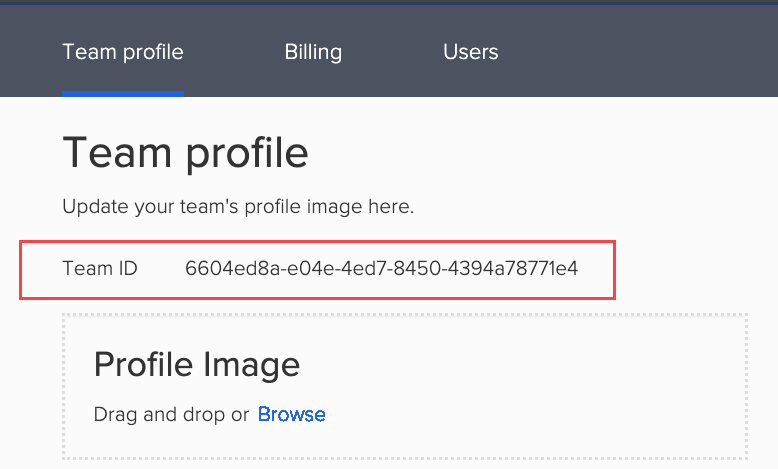
A Team ID is a unique identifier for each team in the Epsilon Retail Media system. It is required in API requests to associate actions with the correct retailer or supplier team, such as generating ads, managing users, or retrieving team level campaign reporting.
#### Finding Your Team ID
To use the Teams API, you’ll need your Team ID. This identifies the retailer or supplier team in API requests. You can find it by:
1. Log in to your Citrus Client.
2. Click the profile dropdown and select **Team Settings**.
3. The Team ID is displayed at the top of the page.
### Team Elements
Each team includes the following key elements:
| Field Name | Description |
| --------------- | ---------------------------------------------------------------------------------------------------------------------- |
| Team ID | A unique identifier for the team. |
| Team name | The team's name. |
| Company name | The name of the company associated with the team. |
| Company website | The official website URL of the company. |
| Phone number | The contact phone number for the company. |
| Company address | The physical address of the company. |
| Postcode | The postal code for the company's address. |
| Business ID | An identifier used for business or legal purposes. |
| ad financier | Entity funding the advertisement, required for compliance with regional laws like the EU’s Digital Services Act (DSA). |
### Team API Field Definitions
| Field Name | Description |
| ---------------------- | --------------------------------------------------------------------------------------- |
| id | The unique ID of the team. |
| name | The name of the team. |
| namespaceId | The unique identifier of the namespace. |
| companyName | The name of the company to which the team belongs. |
| companyWebsite | The URL of the company website. |
| companyPhone | Legacy field. The phone number of the company. |
| companyAddress | The address object for the company's location. |
| userIds | Unique identifiers of users belonging to the team. |
| reviewerEmail | Email to notify when a campaign needs review. Applicable to Primary Retailer team only. |
| sellerId | Unique supplier/merchant ID provided by a Retailer. Must match retailer-provided ID. |
| notificationRecipients | Recipients for campaign notifications. |
### Available endpoints
| Endpoint | Description |
| -------------------------------------- | --------------------------------------------------------------------------------------------------------------------------------------------------------------------------------------------------------------------------------------------------------------------------------------------------------------------------------------------------------------------------- |
| [Create team](#) |
Creates a new team. A team represents a supplier such as advertiser, ad management platform, or marketplace vendor.
Permissions: Retailers: Can create teams on behalf of suppliers or advertisers (requires configuration). By design, retailers cannot create retailer teams. Suppliers: Can create teams (if allowed by retailers).
|
| [Update a team](#) |
Updates team details including name, company information, phone number, website URL, and address. Note: This endpoint is subject to configuration. Ensure the relevant feature flag or setting is enabled in your environment to use this API.
|
| [Lists all teams](#) | Retrieves teams using parameters: `name`, `namespace_id`, `seller_id`. Use `page_token` for navigation and`page_size` to control results per page. |
| [Get team for specified ID](#) | Retrieves detailed information about a specific team, including its members. |
| [Join a team with invitation token](#) | Allows users to join a team using a valid invitation token. |
For common questions and troubleshooting tips, see [Frequently asked questions](/partner/reference/frequently-asked-questions.md#team-and-user).